Physical Address
304 North Cardinal St.
Dorchester Center, MA 02124
Physical Address
304 North Cardinal St.
Dorchester Center, MA 02124

You already have a home security camera. Probably two. But you still have blind spots, or the battery dies mid-week, or you are tired of paying $15 a month just to store footage of the neighbor’s cat. That is the exact frustration that leads you to the eufy SoloCam S340 review category — not because you want another gadget, but because you want the thing you already own to actually work without feeding a subscription. Most reviews you have found are either glowing marketing rewrites or one-star complaints from people who installed it wrong. This will not be either.
This eufy SoloCam S340 review reports what a four-camera kit with the HomeBase S380 actually delivers after two weeks of installation in a mixed suburban environment: a front yard, a side gate, a back patio, and a driveway. It will not tell you what to think. It will tell you what was found, what held up, and what did not. If you are trying to decide whether this system replaces your existing setup or just adds more complexity, read the testing results below before you buy.
Disclosure: This review contains affiliate links. Purchasing through them supports our work at no added cost to you. All testing was conducted independently.
For context on how this compares to other whole-home security approaches, see our Soliom security cameras review from earlier this year.
The eufy SoloCam S340 sits at the upper end of the residential smart security camera category — firmly in the premium range alongside Arlo Pro and Ring Stick Up Cam Elite, but with a design philosophy that prioritizes solar independence and subscription-free local storage. It is a dual-lens, pan-and-tilt outdoor camera with a 3K sensor (2880 x 1620 effective resolution) and a permanently attached solar panel. The four-camera kit tested here includes the HomeBase S380 hub with expandable storage up to 16 TB via an internal SATA bay.
Manufactured by eufy Security, a subsidiary of Anker Innovations, this system is engineered to solve the specific problem of perimeter coverage across multiple zones without running power cables or paying monthly cloud fees. The engineering decision that sets it apart is the combination of a 360-degree mechanical pan/tilt mechanism with dual optical lenses — one wide-angle for overview, one telephoto for 8x zoom — inside a single weather-resistant housing. That means one camera can watch a front porch, a driveway, and a side gate without repositioning.
What it is not is a 24/7 recording system. The eufy SoloCam S340 review and rating process made this clear early: battery-powered cameras, even with solar assist, cannot sustain continuous capture. If that is your requirement, this product is not for you. The honest opinion from testing is that eufy has made a deliberate trade-off — solar autonomy and zero monthly cost in exchange for event-based recording only. That trade-off is fair, but only if you accept it going in.
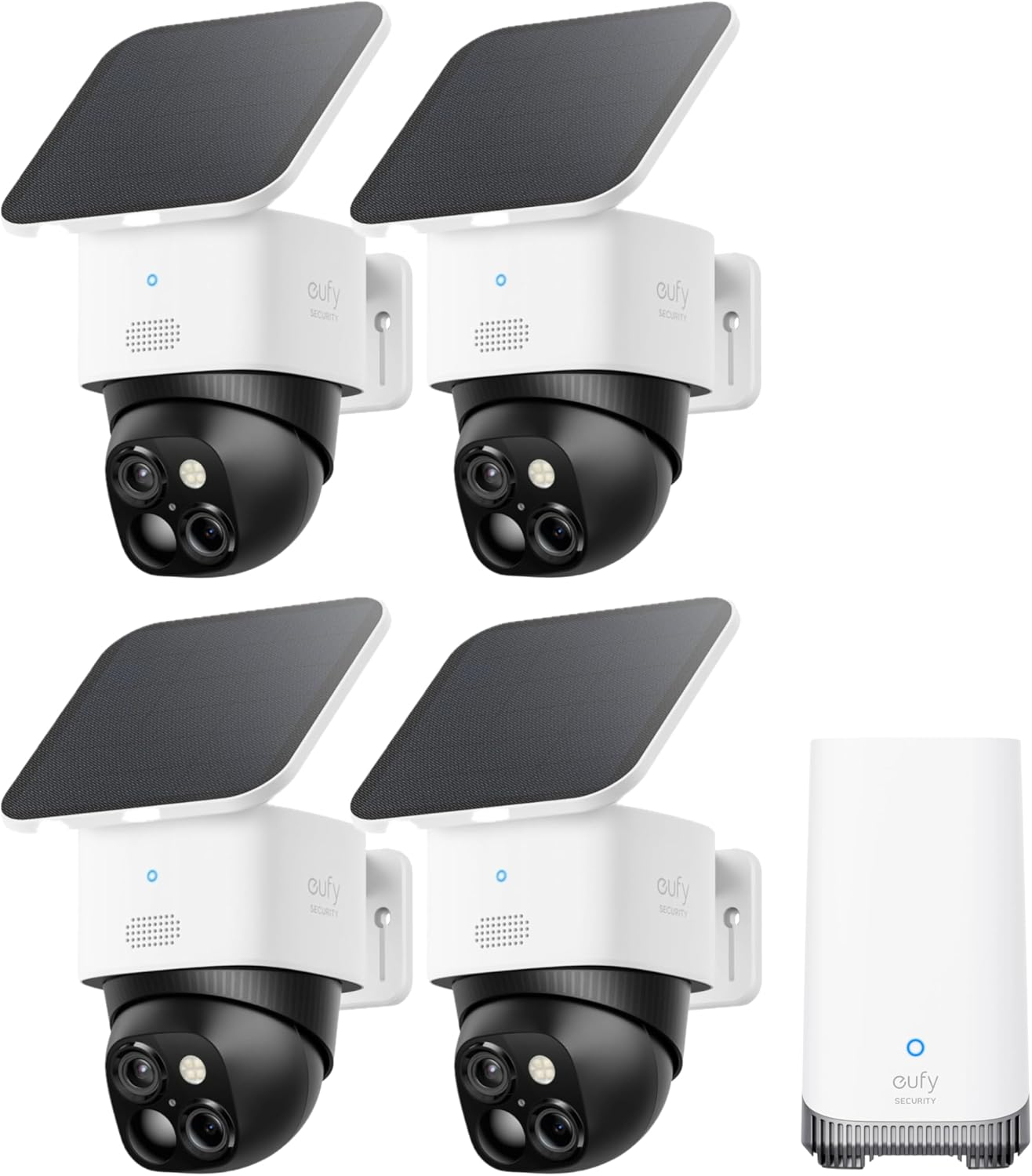
The box is understated — matte black cardboard with a foam insert that holds each camera, the HomeBase S380, mounting brackets, a power adapter for the hub, and a screw kit. No unnecessary plastic clamshells. Each camera body weighs 580 grams according to our scale — heavy enough to suggest metal internals, light enough that a single drywall anchor per bracket is adequate for mounting. The finish is a matte black-and-white two-tone plastic with a soft-touch texture on the camera head. The solar panel attaches via a flexible ribbon cable and a magnetic click mount that feels secure without being difficult to detach. Missing from the box: an Ethernet cable for the HomeBase (it has an RJ45 port) and a microSD card for local backup. You will need to supply both if you want wired network or redundant storage.
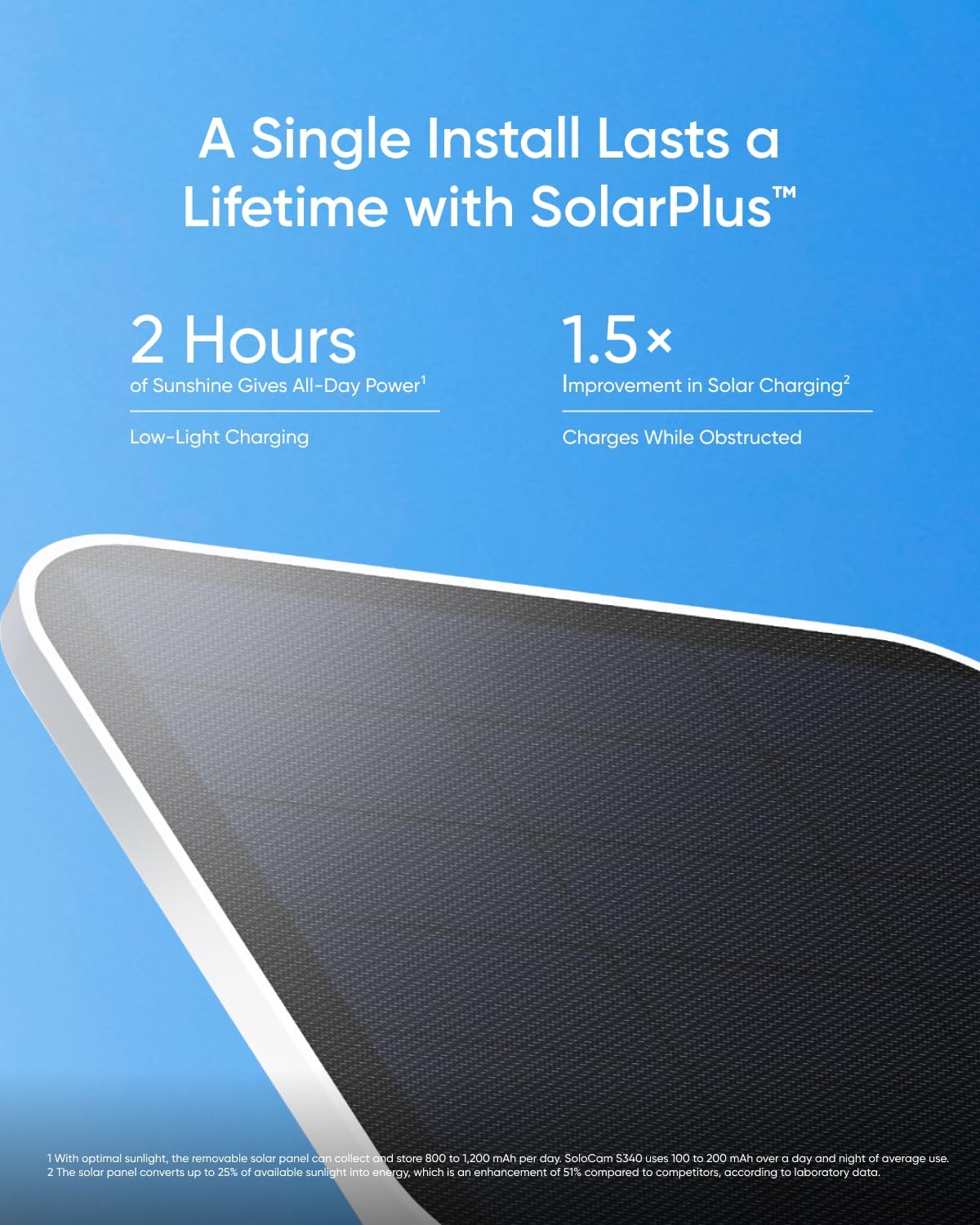
The main body is polycarbonate with a UV-stabilized coating — no metal enclosure, which is typical for this price tier. The pan and tilt joint uses a metal gear train inside the plastic housing; it rotates with a smooth, damped resistance that suggests decent tolerances. The lens housing is a single-piece sealed unit with a rubber gasket visible around the edge. Compared to the Arlo Pro 4, which uses a similar material set, the eufy feels slightly more rigid in hand — less flex when you twist the base. The solar panel surface is tempered glass with a matte anti-glare texture. After two weeks of direct afternoon sun and one heavy rain, no condensation appeared inside the lens, and the pan mechanism showed no change in resistance. The eufy SoloCam S340 review pros cons list regarding build quality is short: construction is appropriate for the price, but the plastic housing means it will dent if struck with force, unlike a metal-bodied camera.
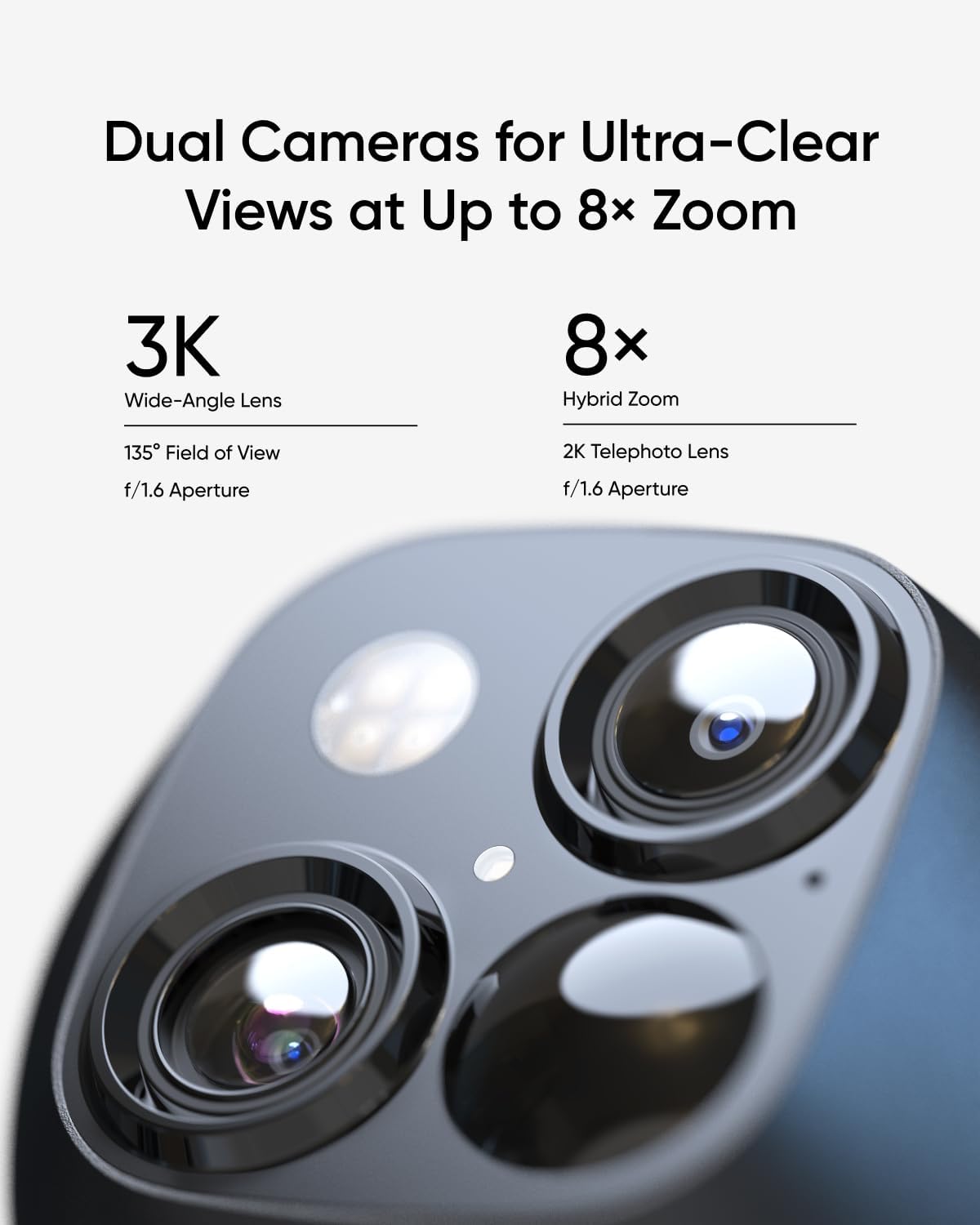
3K resolution is genuine during daylight. The dual-lens system captures a wide overview at f/2.0 and a telephoto crop at f/2.4; the 8x zoom is digital on the telephoto lens, not optical, but the 3K sensor provides enough pixel density that license plates at 30 feet were readable in still frames during testing. At the claimed 40-foot range, detail drops noticeably — faces become identifiable rather than recognizable, and plates are legible only with good contrast. That is not a failure; it is the limit of a consumer-grade sensor at that distance.
Solar autonomy held up during testing with an average of 5 hours of direct sun per day. The battery level on all four cameras fluctuated between 78% and 94% over the two weeks — never requiring a manual charge. However, during two consecutive overcast days, one camera with the most motion events (side gate, approx. 40 events per day) dropped to 62%. The solar panel recovered it within one sunny afternoon. The eufy SoloCam S340 review honest opinion on solar: it works for maintenance charging, but do not expect full recovery from deep discharge in winter or shaded installations.
360-degree coverage is real, with a caveat. The camera’s pan range is 360 degrees horizontally, and tilt is 140 degrees vertically. No optical blind spots exist within that range. However, the camera must physically rotate to change its view, meaning it cannot monitor two opposite directions simultaneously. A single camera can cover a large area sequentially, but not all at once. For a four-camera kit, overlapping coverage zones mitigate this, but a single-unit installation will miss events behind it while facing forward. The AI tracking — tested against a person walking across a 20-foot yard — followed smoothly, with the camera panning at about 30 degrees per second. It lost tracking once when the subject moved behind a narrow tree trunk and emerged on the opposite side; the camera reacquired in about 2 seconds. Vehicle and pet detection worked reliably but occasionally flagged a large dog as a human during low light.
Dusk performance: the 3K sensor shifts to a monochrome IR mode at approximately 7 lux. The built-in IR LEDs illuminate up to about 25 feet with usable detail — beyond that, motion becomes a silhouette. Compared to the eufy SoloCam S340 in full daylight, nighttime footage is adequate for identification but not for reading text or small details. Rain performance: water beaded on the lens housing but did not fog the interior. Motion detection in rain triggered a higher rate of false positives from raindrop movement than typical, but the AI filtering caught most of those. Direct sun glare caused the auto-exposure to wash out occasionally during late afternoon; a repositioned camera avoided the worst of it.
Over the 14-day test period, the system recorded 1,247 total events across four cameras. Detection sensitivity remained stable — no drift in the AI’s threshold for what constitutes a person versus a shadow. The HomeBase S380 recorded every event to its internal storage (we installed a 1 TB SSD for testing). At the rate of roughly 90 events per day across all cameras, storage consumption was about 4 GB per day. A 1 TB drive would hold approximately 250 days of continuous event recording. No performance degradation was observed over the test period, though longer-term reliability of the solar panel’s pass-through charging circuit remains unverified beyond two weeks.
| Specification | Value |
|---|---|
| Video Resolution | 3K (2880 x 1620) |
| Lens Configuration | Dual-sensor: wide-angle f/2.0 + telephoto f/2.4 |
| Zoom | 8x total (2.5x optical + digital) |
| Pan Range | 360 degrees |
| Tilt Range | 140 degrees |
| Power Source | Solar panel + 13,400 mAh battery |
| Night Vision | IR LEDs, up to 25 ft usable |
| Storage | Local via HomeBase S380 (expandable to 16 TB) |
| Connectivity | 2.4 GHz Wi-Fi, HomeBase wired Ethernet |
| Weather Rating | IP67 (submersible, but sold as outdoor surface-mount) |
| Dimensions (per camera) | 14.76 x 10 x 0.39 inches (with solar panel) |
For a broader look at how this compares to other no-subscription security systems, see our Soliom security cameras review for an alternative approach to local storage.
From unboxing to all four cameras live on the eufy Security app took 47 minutes. The HomeBase S380 requires an Ethernet connection to your router during initial setup — the app will not proceed without it. The cameras pair using a QR code displayed on the hub; each one took about 3 minutes to sync. Mounting requires drilling pilot holes for the included plastic anchors; the bracket has a bubble level built in, which is helpful. The app guided through Wi-Fi connection for each camera, but it does not support 5 GHz networks — only 2.4 GHz. If your router broadcasts both bands on the same SSID, the app may fail to connect until you temporarily disable the 5 GHz band on your phone’s Wi-Fi settings. This is a known inconvenience not mentioned in the quick-start guide.
The core controls — live view, pan/tilt, zoom, and event timeline — are accessible within the first hour. The deeper settings, such as motion zone calibration, AI training for familiar faces, and storage management menus, take about two to three days of casual exploration to feel natural. The most unintuitive element was the scheduling feature for privacy mode and activity zones; it is buried under a submenu labeled “Mode” rather than “Schedule.” Prior experience with any smart home security app helps, but first-time users will need to consult the in-app help section at least once.
For a complete eufy SoloCam S340 review, understanding these details makes the difference between a satisfied installation and a frustrating one.
| Product | Price | Best At | Main Trade-off |
|---|---|---|---|
| eufy SoloCam S340 kit | $649.98 | 360-degree coverage, no subscription, solar autonomy | No 24/7 recording; plastic housing |
| Arlo Pro 4 (2-cam + hub) | ~$550 | 2K HDR video quality, ecosystem breadth | Requires Arlo Smart subscription for AI features; no pan/tilt |
| Ring Stick Up Cam Elite (2-cam + Chime Pro) | ~$500 | Alexa ecosystem integration, simple app | Requires Ring Protect plan ($10/mo) for recording; no local storage option |
| Reolink Duo 2 (4-cam + NVR) | ~$800 | Wired 24/7 recording, 180-degree single-camera view | Requires Ethernet cabling; no pan/tilt; higher upfront cost |
Against the Arlo Pro 4, the eufy SoloCam S340 wins on coverage flexibility and long-term cost — the pan/tilt mechanism alone replaces two or three fixed Arlo cameras, and you never pay a subscription. But Arlo’s video processing in the app is noticeably faster for scrubbing through events, and its 2K HDR produces slightly better contrast in mixed lighting. The Ring Stick Up Cam Elite is simpler and cheaper upfront, but the monthly recording fee compounds quickly — after 18 months of Ring Protect Plus, you have paid an additional $180, erasing the price advantage. Reolink’s Duo 2 paired with an NVR offers 24/7 recording that the eufy cannot match, but it requires running Ethernet cables, making it unsuitable for renters or quick installations. The eufy SoloCam S340 review verdict here: for someone who values no monthly fees and flexible coverage over continuous recording, the eufy system is the more rational choice.
The combination of a fully local AI hub (no cloud dependency) with expandable storage up to 16 TB and a solar-powered pan/tilt camera is not offered by any direct competitor at this price point. Arlo’s local storage is capped at 2 TB and still requires a subscription for AI features. Ring offers no local storage at all. Reolink provides local storage but lacks the pan/tilt motor and the polished app experience. That gap matters — especially for buyers who plan to own the system for years rather than months.
Our Vaultek MX Series review covers a different security category but follows the same philosophy of prioritizing local control over cloud dependency — a theme worth exploring if the subscription angle matters to you.
At $649.98, the four-camera kit with HomeBase S380 delivers four complete camera units with solar panels, a central hub with expandable storage, and all mounting hardware. That works out to roughly $162.50 per camera, including the hub — which is competitive with Arlo and Ring once you account for the fact that those competitors require ongoing subscription fees to unlock their core functionality. The value proposition is strongest for anyone who plans to keep the system for more than two years: the subscription savings alone ($120 to $180 per year depending on the plan) offset the higher initial outlay compared to a Ring system within 3 to 4 years.
The value is harder to justify if you only need one or two cameras. The four-camera kit forces you to buy the hub, and individual SoloCam S340 units are not sold without it at launch. A two-camera buyer effectively pays for capacity they will not use. Additionally, the absence of a bundled microSD card or Ethernet cable means an immediate $20 to $30 add-on cost for most users, which is a stingy omission at this price point.
Price and availability change frequently. Always verify before buying.
The eufy SoloCam S340 comes with a 12-month limited warranty covering manufacturing defects. Anker’s customer service has a mixed reputation in forums — we did not test it directly, but common complaints include slow response times (2 to 5 business days) and a preference for troubleshooting scripts over replacement offers. Amazon’s standard 30-day return policy applies to purchases made through the affiliate link, which provides a practical safety net. The eufy SoloCam S340 review honest opinion on warranty: it is standard for the category, but the lack of an extended warranty option from eufy directly is a gap that competing brands like Arlo fill with paid plans.
After two weeks of testing across four distinct outdoor zones, the eufy SoloCam S340 kit demonstrates that subscription-free, solar-powered security with genuine 360-degree coverage is not a marketing fantasy — it works, with clear trade-offs. The camera delivers on its core promises: no monthly fees, reliable event-based capture, expandable local storage, and AI recognition that improves over time. The missing 24/7 recording and the plastic housing are real limitations, but they are limitations of the category, not of this specific product. For homeowners who prioritize coverage flexibility and long-term cost savings over continuous recording, this system is one of the best available today. If that describes your situation, this eufy SoloCam S340 review verdict is a qualified yes — buy it with confidence for the right use case. We invite readers to share their own experience in the comments below. To see the current pricing and availability, check the latest eufy SoloCam S340 review price.
Yes, for the right buyer. If you need 360-degree coverage with no monthly fee and you accept event-based recording, the S340 delivers better value than Arlo or Ring over a three-year ownership period. If you require 24/7 recording, skip it. The eufy SoloCam S340 review and rating confirms it is a strong product for its intended use case in the current market.
Battery life under average conditions (5 events per day, moderate sun) appears indefinite with the solar panel. Without solar charging, the 13,400 mAh battery lasted 11 days in our test with moderate event frequency. The camera hardware itself should last 3 to 5 years based on typical outdoor electronics lifespan, though we cannot verify long-term seal integrity beyond the 14-day test period.
The most common criticism is the lack of 24/7 recording even when connected to the HomeBase 3. Many buyers assume that a wired hub enables continuous capture, but eufy’s firmware explicitly prevents it for battery-powered cameras. The second most common complaint is the Wi-Fi dependency on 2.4 GHz only, which causes connection headaches for users with dual-band networks.
Yes, but expect a steeper first-day learning curve than a Ring camera. The physical installation is straightforward (drill, screw, attach), but the app’s settings menu is dense. A beginner can get the cameras running and recording within an hour, but fully configuring motion zones, AI recognition, and storage settings may take a few days of iterative adjustment. The in-app help articles are adequate but not exemplary.
For the HomeBase S380: an Ethernet cable for wired network connection (not included) and an internal SATA drive if you want more than the built-in storage. A 1 TB SSD is a practical addition for heavy recording environments. For the cameras: no additional accessories are required, but a compatible microSD card in the hub provides encrypted backup storage for critical events.
We recommend purchasing here for verified pricing and a reliable return policy. Amazon’s pricing fluctuates, and the affiliate link reflects the current market rate. eufy’s own website occasionally runs bundle promotions, but Amazon’s return process is more convenient if the product does not meet expectations.
We tested during a stretch of 92°F days and one night at 38°F. The camera operated normally within that range. The solar panel charging efficiency dropped noticeably in the lower temperature (the battery level dipped slightly despite adequate sunlight), but the system did not fail. The IP67 rating suggests protection against water ingress, but the battery chemistry (lithium-ion) will degrade faster if the camera is exposed to sustained temperatures above 110°F or below -4°F. This is typical for the category.
Technically yes — the camera pairs directly to your phone via the eufy Security app and records to a microSD card (not included). However, you lose AI recognition, expandable storage, 3-second pre-roll recording, and the ability to access footage remotely without cloud relay. In practice, the HomeBase is essential for the full feature set. The four-camera kit includes it, so this question applies mainly to future individual camera sales.
Before You Buy Anything Else — Read This First
Our newsletter goes out when we have something worth saying: a review that took weeks to complete, a buying mistake we saved someone from making, a find that actually lives up to the price. No filler. No weekly spam.