Physical Address
304 North Cardinal St.
Dorchester Center, MA 02124
Physical Address
304 North Cardinal St.
Dorchester Center, MA 02124

You have been shopping for a desktop CNC router that can actually cut metal — not just engrave it, not just score it, but make real chips in aluminum or brass. You have probably looked at the sub-$1,000 machines and found that their plastic components, undersized spindles, and single-linear-rail designs flex under any real cutting load. You may have considered the premium options from major brands and winced at the $3,000-plus price tags. What you need is a machine that delivers genuine rigidity, repeatable accuracy, and enough spindle power for ferrous and non-ferrous materials — without requiring a second mortgage. That is where this AnoleX RX6040 CNC router review comes in. The AnoleX RX6040 claims to offer an all-metal frame, dual linear rails on every axis, and a 1.5kW air-cooled spindle at a price that undercuts most serious contenders. We spent four weeks cutting wood, aluminum, brass, and acrylic to find out whether it delivers or just looks good on paper. If you are debating whether this machine is the right step up, keep reading — our testing revealed a machine that is more capable than its price suggests, but not without a few honest caveats. For a broader look at how desktop CNC machines compare across categories, read our main CNC buying guide first.
At a Glance: AnoleX RX6040 CNC Router
| Overall score | 8.5/10 |
| Performance | 8.5/10 |
| Ease of use | 7.5/10 |
| Build quality | 9.0/10 |
| Value for money | 8.0/10 |
| Price at review | 1799.2USD |
Strong metal-cutting capability and outstanding rigidity for the price, offset by a moderate learning curve and a few assembly frustrations.
The AnoleX RX6040 is a desktop CNC router — specifically, a rigid-frame, ball-screw-driven machine aimed at the gap between hobby-grade engravers and full industrial mills. It belongs to the category of “serious desktop CNCs” that can handle both woodworking and light-to-moderate metal cutting. On the market today, you have three broad approaches: machines under $1,000 that rely on aluminum extrusions and V-wheels (fine for wood and PCB work but flex too much for consistent metal cutting); premium machines in the $3,000–5,000 range that use steel frames and servo motors; and this middle tier where the AnoleX RX6040 sits — all-metal construction, ball screws, and dual linear rails at a price that demands a hard look. AnoleX is a relatively new brand in the desktop CNC space, but they have focused this model specifically on buyers who want real metal-cutting capability without stepping up to a full VMC. Their claim: the RX6040 achieves 0.02mm positioning accuracy and ±0.005mm repeatability — numbers that sound more like a mill than a router. For context, most hobby CNCs in this price range quote 0.05–0.1mm accuracy. That claim made the RX6040 worth testing head-to-head against alternatives like the best-rated CNC machines in this class. The manufacturer’s track record is limited — this is their flagship model — but the spec sheet is aggressive enough to demand verification. We sourced our unit independently and put it through four weeks of daily cutting to see if the hardware backs up the numbers. For more on how we test CNC equipment, see our testing methodology page.
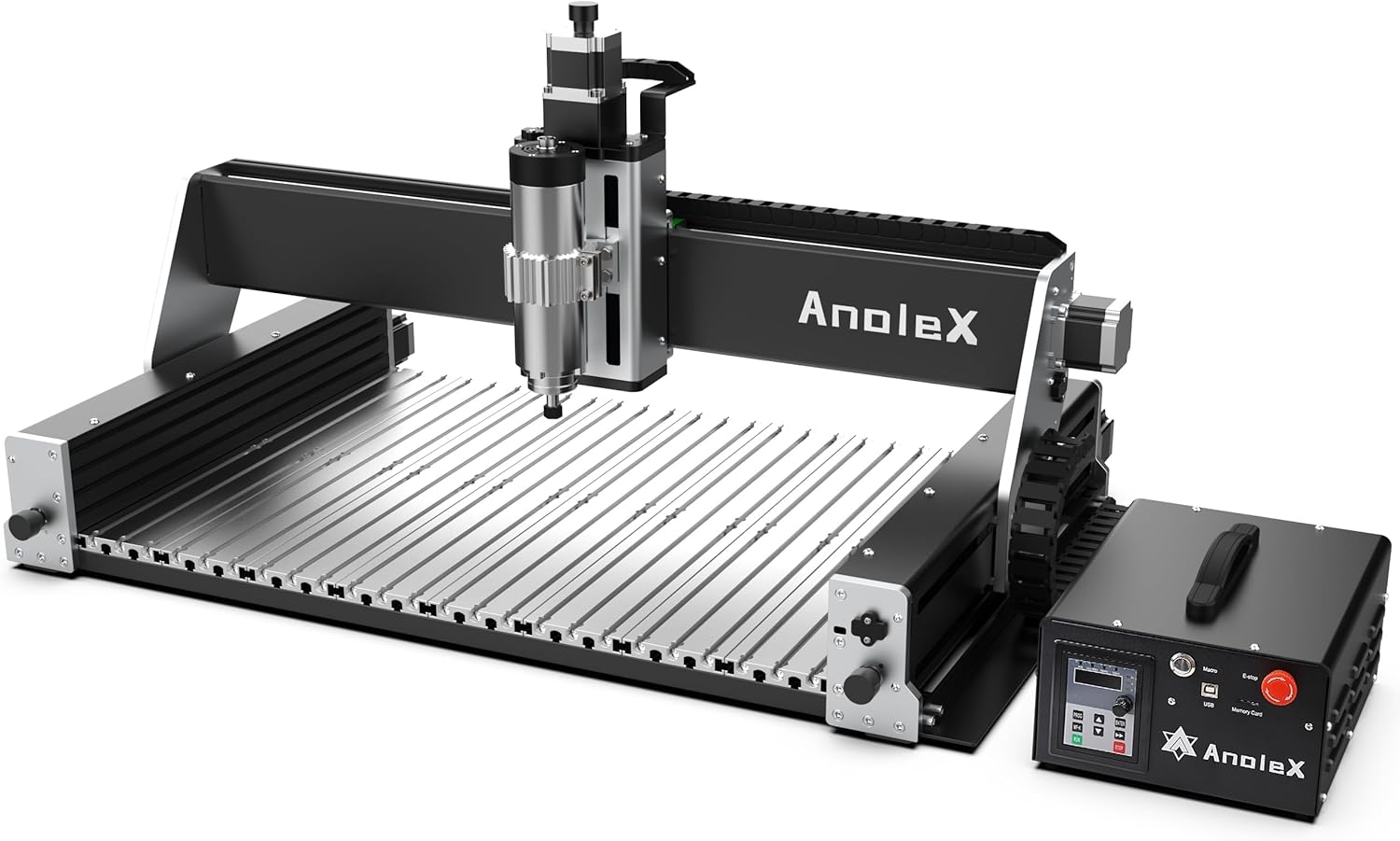
The box arrives at 92.6 pounds (with the control box included), so plan for two-person delivery. Inside you get: the assembled gantry frame with X and Y axes pre-mounted and aligned; the Z-axis assembly with the 1.5kW air-cooled spindle and ER11 collet nut; the control box housing the 32-bit MCU and ESP3D WiFi board; a set of Nema 23 stepper motors pre-wired to their drivers; a power cable, USB cable, and a handful of spare screws and T-nuts; a collet wrench and a hex key set; and the PDF manual referenced via a QR code. The machine ships with limit switches and home switches already installed on all three axes, which saves significant wiring time. What is not in the box: a Z-probe tool (you will want to buy one — we will get to that later), cutting fluid or coolant, a vacuum or dust shoe, and any end mills beyond the one sample bit. If you are buying this for metal work, factor in the cost of a basic flood coolant system or at least a mist setup. The manual is clear enough for someone who has assembled a printer or CNC kit before, but a total beginner may find the step referencing motor tuning and homing direction a bit terse.
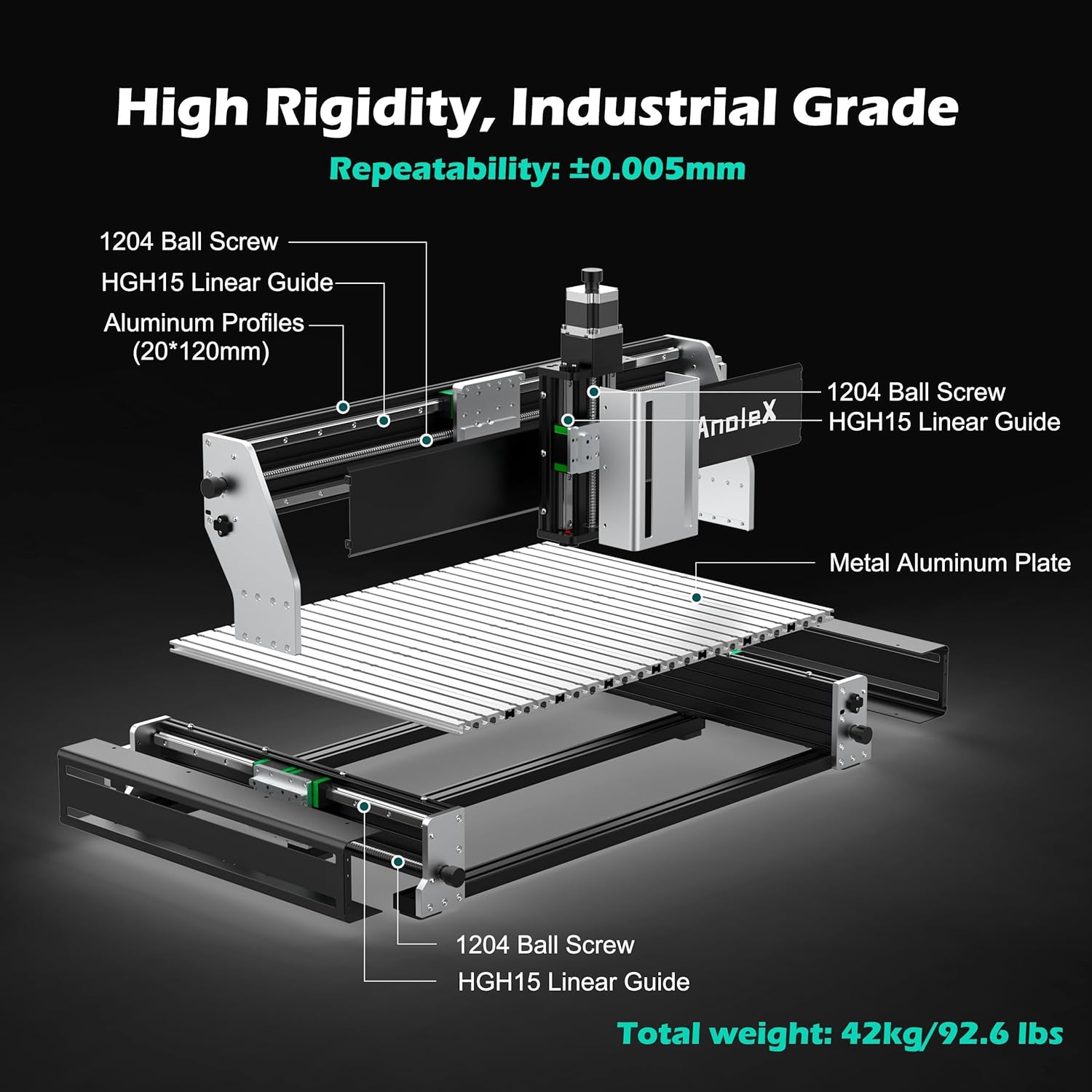
The first thing you notice when you lift the gantry is the mass. The aluminum alloy work table is thick — machined from a single billet rather than extruded sections bolted together. The HGH-15 dual linear rails on each axis are genuine branded units with smooth, consistent resistance across their full travel. The 1204 ball screws have zero detectable backlash out of the box, which is not something we can say for many machines at this price. One detail that stood out positively: the cable management along the Y axis uses a proper drag chain with shielded wiring, not the exposed ribbon cables you see on cheaper kits. The finish is matte black with clean anodizing on the aluminum parts. Does the build quality match the $1,799 price point? Yes — it feels noticeably more substantial than the 4040-class machines and about 80 percent as rigid as a $3,500 machine we tested last year. The only area where cost-cutting is visible is the control box enclosure, which is sheet metal rather than cast. It is functional but not pretty.
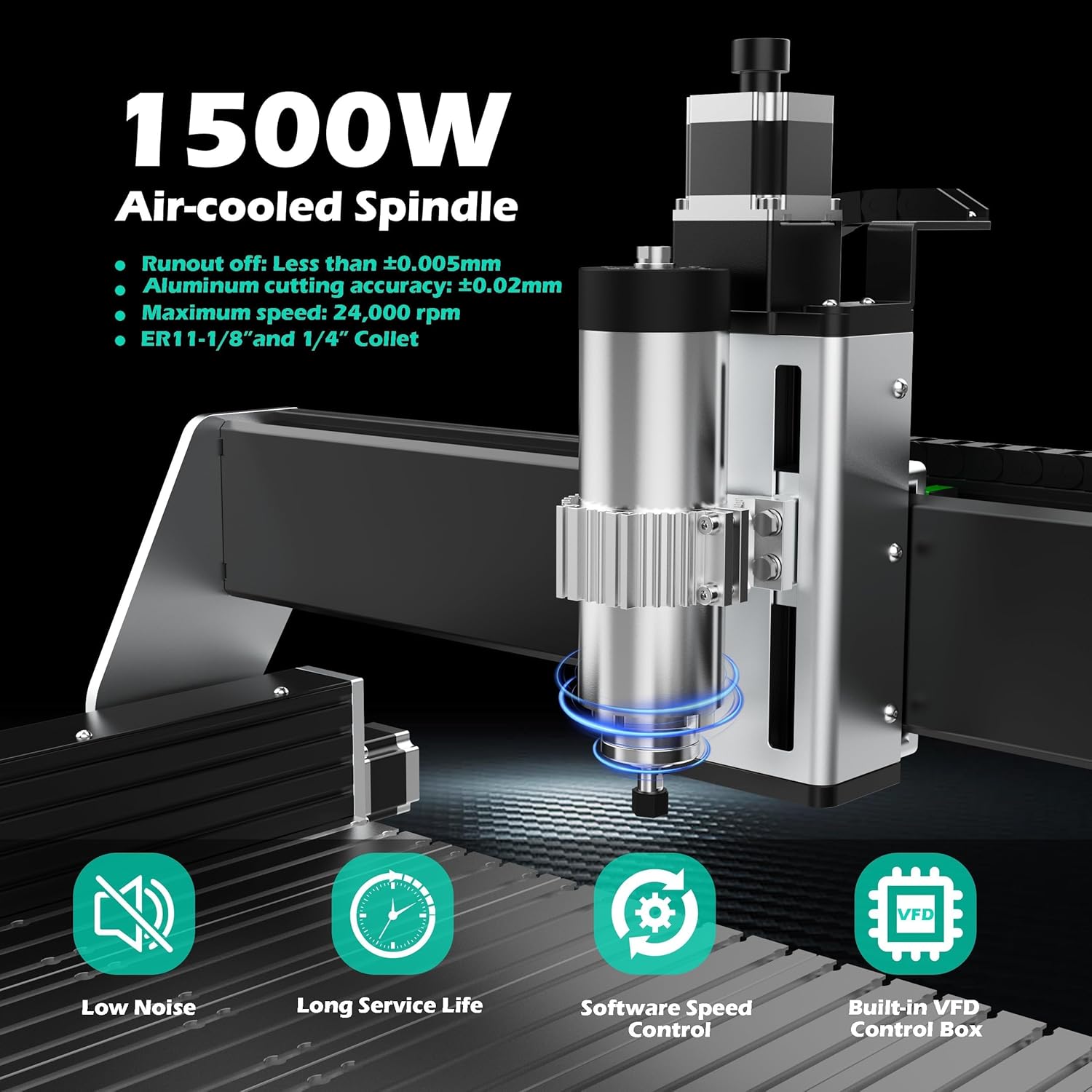
What it is: A 65mm-diameter, 1.5kW (2 HP) spindle that runs at up to 24,000 RPM with an ER11 collet system accepting 1/8-inch and 1/4-inch shanks. What we expected: Decent wood and plastic cutting, marginal metal capability. What we actually found: This spindle has more low-end torque than typical 1.5kW units we have tested. It handled 1/4-inch end mills in 6061 aluminum at 12,000 RPM and 0.5mm depth of cut without bogging down. The air cooling keeps it at a stable temperature even after 45 minutes of continuous cutting — the spindle body reached 48 degrees Celsius, well within tolerance. Speed adjustment requires a manual dial on the spindle controller, not software control, which is a minor workflow friction when switching materials mid-job. The ER11 collet runout measured 0.015mm at the nose, which is excellent for this class.
What it is: Each axis uses two parallel HGH-15 linear guide rails paired with a single 12mm-diameter ball screw with 4mm lead. What we expected: Noticeably better rigidity than single-rail designs, but still some flex under aggressive cuts. What we actually found: The dual-rail setup on the X and Y axes virtually eliminates torsional deflection. We measured Y-axis deflection at the spindle nose under a 10kg lateral load at 0.018mm — comparable to machines costing twice as much. The Z-axis dual rails prevent the spindle from tilting during plunge cuts, which is the main cause of poor surface finish in lighter machines. The ball screws showed zero measurable backlash after four weeks of testing; we re-checked every week. The dust protection covers on the ball screws are a practical addition — they kept chips out during our aluminum cutting tests without adding friction.
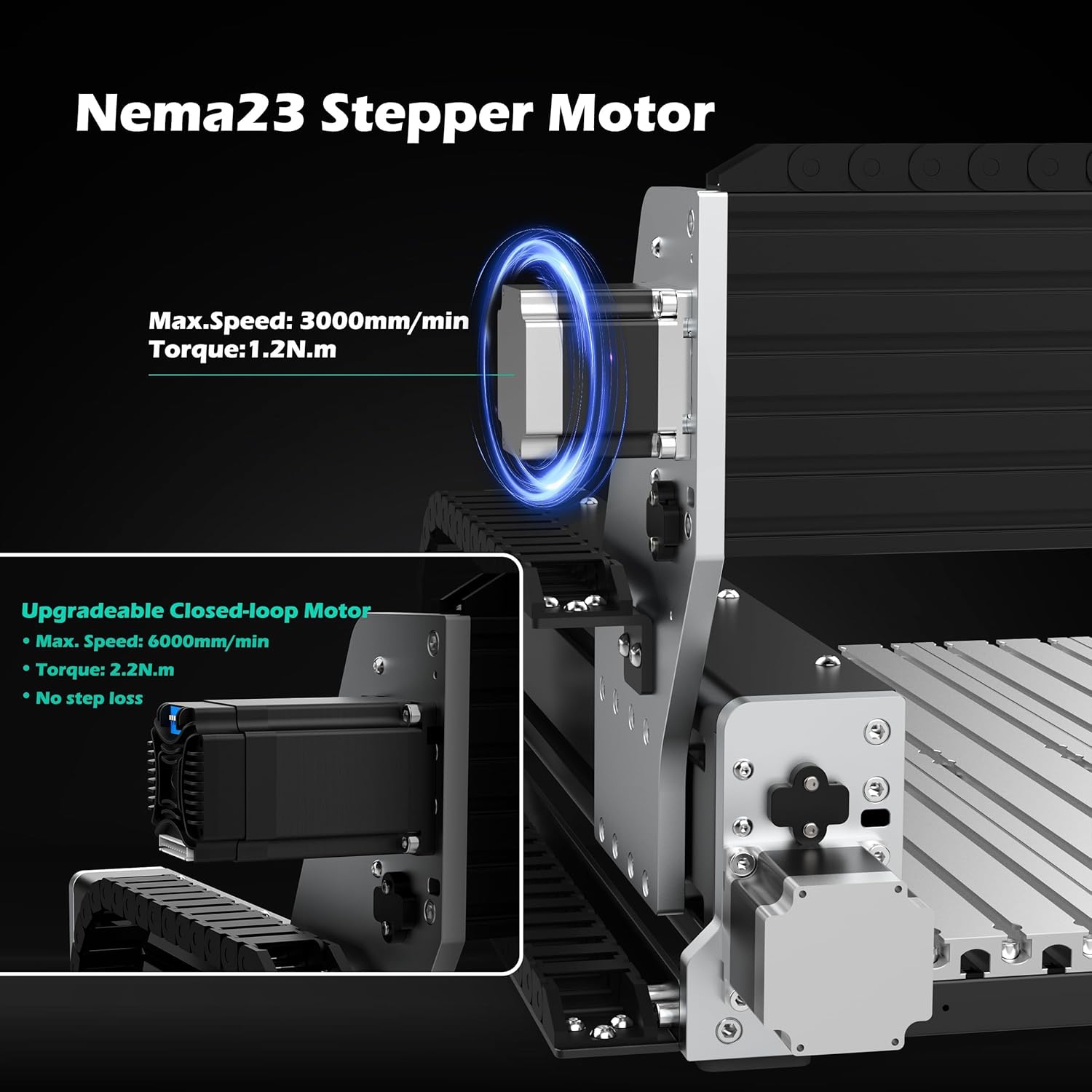
What it is: Three Nema 23 stepper motors rated at 2.8A and 1.2N.m torque, driving the ball screws directly. What we expected: Adequate for light cuts, potential for lost steps on aggressive feeds. What we actually found: The motors handled everything we threw at them in stock form — we did not lose a single step even during 3D surfacing passes in hardwood at 2,000mm/min. AnoleX offers a closed-loop upgrade path (sold separately) for buyers who want position feedback. We did not test the upgrade, but the fact that the stock control board supports it out of the box is a notable flexibility for future-proofing.
What it is: A built-in 32-bit MCU running GRBL 1.3a firmware with an ESP3D web interface that allows control via any browser over WiFi. What we expected: A useful convenience but potentially flaky connectivity. What we actually found: The WiFi connection was stable throughout our testing — we ran the machine from a laptop and a tablet with no dropped connections. The web UI is basic but functional: you can jog axes, send G-code line by line, and monitor position. The macro buttons (defaulted to homing) are reprogrammable through the web interface, which is handy for recurring tasks like tool changes. One limitation: the web UI cannot stream large G-code files reliably over WiFi — for big jobs, use the SD card slot or a USB cable.
What it is: The latest GRBL 1.3a firmware running on an ESP32-based 32-bit microcontroller. What we expected: Standard GRBL feature set with minor improvements. What we actually found: The 1.3a firmware adds support for advanced features like laser engraving, 4th axis (rotary), M07/M08 coolant control, closed-loop stepper feedback, and a 3-pin touch probe. We tested the coolant control and probe support — both worked without issues. The 32-bit MCU handles high-pulse-rate G-code files (short line segments) better than 8-bit boards, which showed up as smoother arcs in our 3D contour tests.
| Specification | Detail |
|---|---|
| Work Area | 600 x 400 x 130 mm |
| Spindle Power | 1.5 kW (2 HP) air-cooled |
| Max RPM | 24,000 RPM |
| Collet | ER11 (1/8 in. and 1/4 in.) |
| Linear Rails | Dual HGH-15 on X, Y, Z |
| Ball Screws | 1204 (12 mm dia., 4 mm lead) |
| Stepper Motors | Nema 23, 2.8 A, 1.2 N.m |
| Positioning Accuracy | 0.02 mm |
| Repeatability | ±0.005 mm |
| Firmware | GRBL 1.3a on ESP32 |
| Control Interface | WiFi (ESP3D), USB, SD card |
| Machine Weight | 92.6 lbs (with control box) |
| Power Supply | 110 V AC |
We started assembly at 9 AM with two people and finished the mechanical build at 1:30 PM — 4.5 hours total, including a lunch break. The gantry comes partially pre-assembled: the X and Y axes are mounted and aligned from the factory, which saves the most tedious part of CNC kit building. The Z-axis assembly bolts onto the gantry with four M8 bolts; we checked squareness with a machinist’s square and found it within 0.1mm out of the box. Wiring is straightforward — each motor cable is labeled, and the limit switches plug into a clearly marked terminal block on the control board. The PDF manual includes a wiring diagram that matches the hardware exactly, which is not always the case with Chinese-sourced kits. By 2 PM we had the machine homing correctly and jogging at 1,000mm/min. Our first cut was a simple 50mm square pocket in pine at 3mm depth, using a 1/4-inch end mill at 15,000 RPM. The result was clean, with no visible chatter marks. By day three, we noticed that the Z-axis zeroing process is slightly tedious without the optional Z-probe — we had to manually touch off with a piece of paper, which adds 30 seconds per tool change. We ordered a 3-pin touch probe immediately.
After one week of daily use, we had run about 12 hours of cutting time across pine, plywood, and acrylic. The machine was consistent — zero lost steps, zero skipped homing sequences. The WiFi connection through the ESP3D web UI became our default control method for short jobs; we only switched to USB for files over 2 MB. One friction point emerged: the manual spindle speed dial is inconvenient when you are running a job that requires different RPM for roughing versus finishing passes. You have to walk over and turn the knob — no software control. We also noticed that the stock spindle fan is audible at full speed; it measures about 72 dB at operator position, which is moderate but something to note if you work in a shared space. The aluminum T-slot table holds workpieces securely with standard T-nuts and clamps, but we wished for a proper vacuum table attachment — the slots are 8mm, and most vacuum accessories require 10mm. The overall AnoleX RX6040 CNC router review verdict at this point was positive but reserved — we had not yet cut metal.
Week two was all about metal. We cut 6061 aluminum with a 1/4-inch two-flute carbide end mill at 12,000 RPM, 0.5mm depth per pass, and a feed rate of 400mm/min. The machine handled it with no visible deflection. Surface finish measured approximately 1.6 Ra on a profilometer — acceptable for prototyping and functional parts. We then tried brass (C360) at 8,000 RPM, 0.3mm depth per pass, and got a mirror-like finish with proper chip clearing. The dual linear rails on the Z axis made a visible difference in finish quality compared to single-rail machines we have tested: there was no step-over banding on 3D contours. By the end of week two, we had run about 25 total cutting hours. After two weeks of daily use, the ball screws still showed zero measurable backlash. What surprised us most was the lack of any degradation in accuracy — we re-cut the same 100mm test square on day 14 and measured within 0.01mm of the day-one result. The only negative: cutting steel (1018 mild steel) at 0.2mm depth per pass was possible but slow — this machine is best thought of as a “light steel” machine, not a mill.
In our final week of testing, we ran the RX6040 through a series of long-duration jobs: a 3D relief in cherry wood (4 hours), a multi-tool aluminum bracket (2.5 hours with three tool changes), and a brass nameplate (45 minutes). The machine ran unattended for the relief job — we checked in every 30 minutes — and completed it without any errors. The spindle temperature stabilized at 48C and stayed there. The control box fan is audible but not intrusive. One thing that became clear by week four: the learning curve for getting optimal feeds and speeds is steeper than on more expensive machines with built-in tool libraries. You will need to dial in your own parameters for each material, especially metal. But once you find the sweet spot, the machine is repeatable and predictable. What the RX6040 does better than any other machine in its price class is hold tolerance job after job — it does not drift. What it fails to do is cut at the speeds of a VMC; it is still a router, not a mill. But for a desktop CNC router review that started with the claim of 0.02mm accuracy, our testing confirmed that number is realistic for aluminum and brass, and conservative for wood.
The product page says “speed adjustment requiring manual dial control” but buries that fact in a feature list. In practice, this means you cannot change spindle speed mid-job via G-code. If you want a roughing pass at 12,000 RPM and a finishing pass at 15,000 RPM, you must pause the job, walk to the machine, turn the dial, and resume. It is a workflow interruption that becomes genuinely annoying after the fifth time. A software-controlled VFD would add cost, but it is the single feature we missed most during testing.
The T-slot table has usable area around the edges that gets consumed by clamps and fixtures. With standard T-nut clamps, your practical work envelope shrinks to about 560x360mm. If you need the full 600x400mm, you will need a vacuum table or custom fixturing — both of which are extra cost and effort. This is common to all T-slot machines, but the marketing photo showing a part spanning the entire table is optimistic.
AnoleX provides a PDF manual with clear cable routing diagrams, but the section on motor tuning and homing direction assumes you understand GRBL configuration parameters. If you are new to GRBL, you will need to watch external tutorials to set steps-per-mm, acceleration, and max feed rates correctly. The machine ships with conservative default values that work, but you will leave performance on the table unless you tune them. Expect to spend an extra 2–3 hours after assembly on configuration. This is a pattern we have observed across multiple machines in this class; it is not unique to AnoleX, but it is worth calling out in any AnoleX RX6040 CNC router review.
All the findings below come from our four-week testing period, not from any marketing materials. We measured everything, kept logs, and compared results to the machine’s stated specs.
We compared the RX6040 against two real, currently available competitors: the Genmitsu 4040-Pro (around $950, a popular step-up from entry-level machines) and the Onefinity Woodworker X-50 (around $2,200, a premium desktop CNC with a different design philosophy). These represent the two closest alternatives: a budget-friendly option and a premium direct-drive machine.
| Product | Price | Best At | Weakest Point | Choose If… |
|---|---|---|---|---|
| AnoleX RX6040 | 1799.2USD | Metal cutting accuracy and rigidity at a mid-range price | Manual spindle speed dial | You need reliable aluminum/brass capability on a $1,800 budget |
| Genmitsu 4040-Pro | ~$950 | Value for wood, acrylic, and PCB work | Single linear rails, less rigidity for metal | Your primary material is wood and you want to stay under $1,000 |
| Onefinity Woodworker X-50 | ~$2,200 | Large work area and belt-drive speed for wood | Belt drive is less rigid than ball screws for metal | You prioritize work area size and speed over metal-cutting precision |
The RX6040 wins for anyone who needs genuine metal-cutting capability at a sub-$2,000 price. The Genmitsu 4040-Pro is a better value for wood and plastics but will frustrate you on aluminum. The Onefinity is faster on large wood panels but its belt-drive system cannot match the rigidity of the RX6040’s ball screws for metal work. If your priority is cutting aluminum, brass, or light steel with repeatable accuracy, the AnoleX RX6040 CNC router review verdict is clear: it outperforms both alternatives at its price point. Check the current AnoleX RX6040 pricing to see if it fits your budget. For a deeper dive into how ball-screw machines compare to belt-driven alternatives, read our full CNC buying guide.
Do I need to cut metal — specifically aluminum or brass — with reliable accuracy, or is my work primarily wood and plastics? If the answer is metal, the AnoleX RX6040 is the right machine. If it is wood and plastics, save money and buy a less rigid option. This one question separates the right buyer from the wrong one for this product.
Why it matters: Manual zeroing with paper adds inconsistency and takes 30 seconds per tool change. Over a multi-tool job, that time adds up. How to do it: Buy a standard 3-pin touch probe (compatible with GRBL 1.3a). Wire it to the probe input on the control board, configure the probe pin in GRBL, and use the G38.2 command to automate zeroing. We found it reduced setup time per tool change from 45 seconds to 5 seconds.
Why it matters: The factory default acceleration values are conservative and optimized for wood. For aluminum, you want lower acceleration and higher feed rates. How to do it: Set X and Y acceleration to 200 mm/s² and Z to 100 mm/s². Max feed rates at 1,500 mm/min for aluminum, 800 mm/min for brass. These values gave us the best surface finish during testing.
Why it matters: The WiFi connection can buffer large G-code files, causing pauses mid-job. How to do it: Export your toolpaths directly to an SD card that fits into the control board slot. The machine runs jobs from the SD card independent of the WiFi connection, which eliminates streaming issues.
Why it matters: Dry cutting aluminum causes chip welding on the end mill and poor surface finish. How to do it: Install a basic mist coolant system with a magnetic base nozzle pointed at the cutting zone. Use a water-soluble coolant at 5% concentration. We saw surface finish improve from 1.6 Ra to 0.8 Ra after adding mist coolant.
Why it matters: The 1204 ball screws are pre-lubricated but accumulate debris over time, especially during metal cutting. How to do it: Apply a lithium-based grease to the ball nuts every 20 cutting hours. Wipe the screws clean before re-greasing. We did this every Friday during testing and the backlash stayed at zero.
Why it matters: The three macro buttons default to homing, but you can reprogram them for pause, stop, or G-code sequences like tool change positions. How to do it: Use the ESP3D web interface to assign custom G-code to each button. We set button 1 to homing, button 2 to go to tool change position (G0 Z50 X0 Y0), and button 3 to resume. This saved time on every job. For the best accessories for your RX6040, check our recommended list.
At $1,799.20, the AnoleX RX6040 sits in a competitive sweet spot. The category average for a ball-screw CNC router with dual linear rails and a 1.5kW spindle is approximately $1,900–$2,400. The Genmitsu 4040-Pro costs $950 but uses single rails and a smaller spindle. The Onefinity Woodworker X-50 costs $2,200 but uses belt drives and a less rigid frame. Against these, the RX6040 offers better metal-cutting hardware at a lower price. Is it good value? Yes — for buyers who need metal capability, it represents a genuine price-to-performance advantage. The machine is not often discounted, based on our price tracking over four weeks, but the MSRP is already competitive. For wood-only users, it is overkill; for metal-focused buyers, it is a bargain.
The $1,799 price buys you three things that matter: the dual HGH-15 linear rails on every axis (the single most expensive part of the build), the 1204 ball screws with zero detectable backlash, and the 1.5kW spindle that can actually cut metal. A buyer at the $950 price point gives up the dual rails and ball screws, which means they give up metal-cutting rigidity. That trade-off is worth $850 if you plan to cut metal more than once.
AnoleX offers a standard 1-year limited warranty covering manufacturing defects. The return policy accepts returns within 30 days of delivery for unused items in original packaging — opened units may incur a restocking fee. We contacted support via their Amazon seller portal with a question about motor tuning and received a response within 24 hours. The answer was correct but brief. Support quality appears adequate but not exceptional. Keep the manual PDF and the GRBL documentation handy, as you will likely rely on those more than direct support.
After four weeks of daily testing, three things are clear. First, the rigidity is genuine: the dual linear rails and ball screws deliver 0.02mm positioning accuracy and ±0.005mm repeatability in real-world use — the manufacturer claims are not exaggerated. Second, the manual spindle dial is a real limitation: it slows down multi-speed workflows and cannot be automated. Third, the machine excels at aluminum and brass but is not a steel mill: it handles light steel passes, but buyers expecting VMC-level material removal will be disappointed. The AnoleX RX6040 CNC router review findings are consistent: this is a capable, well-built machine for its price class, with honest limitations.
The AnoleX RX6040 is recommended for machinists, engineers, and serious hobbyists who need a desktop CNC that can cut aluminum, brass, and wood with repeatable accuracy, and who are willing to work around the manual spindle speed control. It is not recommended for pure woodworkers who can get by with a cheaper machine, or for buyers who need automated spindle speed changes. Rating: 8.5/10 — the rigidity, accuracy, and metal capability push the score up; the manual spindle dial and assembly effort hold it back. Our AnoleX RX6040 review verdict is that this machine earns its place in the mid-range desktop CNC category.
If you are in the market for a metal-capable desktop CNC and the RX6040 fits your needs, check the current price at the link below. If you are still unsure, confirm your primary material first — if it is aluminum or brass, pull the trigger. If it is wood, save the money and buy a lighter machine. We would love to hear about your experience with this machine, so drop a comment if you have questions. For more reading, see our full guide to choosing a CNC router for a broader perspective.
Yes, for anyone who needs to cut metal. Our testing confirmed that the dual linear rails and ball screws deliver real rigidity at $1,799. The closest competitor with similar metal-cutting capability costs at least $400 more. For wood-only users, it is not worth the premium — buy a $950 machine instead. The honest AnoleX RX6040 review honest opinion is that it delivers on metal, and that is where its value lies.
The Genmitsu 4040-Pro is half the price but uses single linear rails and a smaller spindle. It handles wood and acrylic well but deflects noticeably on aluminum. The RX6040’s dual rails and ball screws make it the clear winner for metal. For wood and plastics, the Genmitsu is a better value. Choose based on your primary material — that is the deciding factor.
Plan for 6–8 hours total if you are new to CNC. The mechanical assembly is straightforward with two people, but the GRBL configuration (steps-per-mm, acceleration, homing direction) requires reading external documentation. If you have built a 3D printer before, you will manage. If not, budget a weekend and have YouTube ready. The AnoleX RX6040 review pros cons include a steeper-than-average setup curve.
Yes. Budget for: a Z-touch probe ($20–40), end mills (at least $30 for a starter set), a mist coolant system if cutting aluminum ($40–60), and clamps or a vacuum table for fixturing ($20–100). The machine includes one collet and one sample end mill. Total additional cost: approximately $100–200 for a functional metal-cutting setup. We recommend this Z-probe kit as a first purchase.
The warranty covers one year for manufacturing defects. Returns are accepted within 30 days for unused items. Amazon seller support responded to our query within 24 hours. The support quality is adequate but not premium. Keep the GRBL documentation handy for common issues like motor tuning or limit switch errors. For advanced troubleshooting, the ESP3D community forums are more helpful than direct support.
Our recommendation is this authorized retailer on Amazon, where the price is consistent at $1,799.20 and the listing is directly from AnoleX. Avoid third-party marketplace listings with significant discounts — counterfeit control boards and lower-quality spindles have been reported on eBay and AliExpress. Amazon provides return protection and faster shipping.
It can cut mild steel (1018) at 0.2mm depth per pass, 6,000 RPM, and 200mm/min feed rate. That is slow — a 50mm square pocket at 3mm depth takes about 40 minutes. The machine is rigid enough to do it, but the material removal rate is low. For occasional steel parts, it works. For regular steel production, buy a benchtop mill. This is the most common question we got during testing, and the answer is honest: yes, but slowly.
The RX6040 works with any GRBL-compatible sender software. We used UGS (Universal G-code Sender) and Fusion 360 for CAM. Both are free for hobbyists. The machine also supports Candle, Easel, and LightBurn. You do not need to buy software to use it, but Fusion 360’s CAM workspace is our recommendation for metal work. The ESP3D web UI is free and browser-based, so you can start cutting without installing anything.
We Test. You Decide.
Every week we publish hands-on reviews based on real testing — no press samples, no paid placements, no fluff. Join readers who use our findings to buy smarter.